
How to Prepare for a Telehealth Visit: 2026 Guide

TL;DR:
- Preparing a telehealth visit involves testing your device, organizing medical information, and choosing a private, well-lit space. This ensures clear communication, accurate assessment, and a productive appointment. Proper preparations lead to better health outcomes and a smoother virtual experience.
A telehealth visit is a scheduled medical consultation conducted over video, phone, or secure messaging between a patient and a licensed provider. Knowing how to prepare for a telehealth visit makes the difference between a productive appointment and a frustrating one. The three core preparation areas are technology setup, medical information readiness, and your physical environment. Verify your insurance coverage before the visit, since telehealth policies often differ from in-person coverage. Gardenstatemedicalgroup recommends treating your virtual appointment with the same care you would give an in-office visit.
How to prepare for a telehealth visit: technology setup
Your device, internet connection, and software are the foundation of every virtual appointment. A weak connection or outdated browser can cut your visit short before you address a single health concern.

Start by confirming your device is compatible with the telehealth platform your provider uses. Most platforms support smartphones, tablets, and laptops running current operating systems. Update your browser and any required apps at least 24 hours before your appointment. Updates often include security patches and performance fixes that directly affect call quality.
Test your camera and microphone before the day of your visit. Many platforms offer a test call feature you can run in advance. If your built-in microphone picks up too much background noise, a pair of wired earbuds with a microphone will deliver cleaner audio.
Your internet connection should be stable and fast enough to support video. A wired ethernet connection is more reliable than Wi-Fi, but if you use Wi-Fi, sit close to your router. Avoid scheduling your appointment during peak household usage hours when bandwidth is shared across multiple devices.
Must-have tech items for your telehealth visit:
- A smartphone, tablet, or laptop with a working camera and microphone
- Updated browser or telehealth app installed and tested
- Stable internet connection, wired or strong Wi-Fi
- Earbuds or headphones with a built-in microphone
- Backup device (a second phone or tablet) in case of failure
- Charger or fully charged battery before the call begins
Pro Tip: Stable device placement prevents shaky video that makes it harder for your provider to assess you visually. Prop your device against a stack of books or use a phone stand to keep the camera at eye level.
How do you organize your medical information before the appointment?
Organized health information turns a 15-minute call into a genuinely useful consultation. Without it, you risk forgetting key symptoms or leaving without the answers you need.
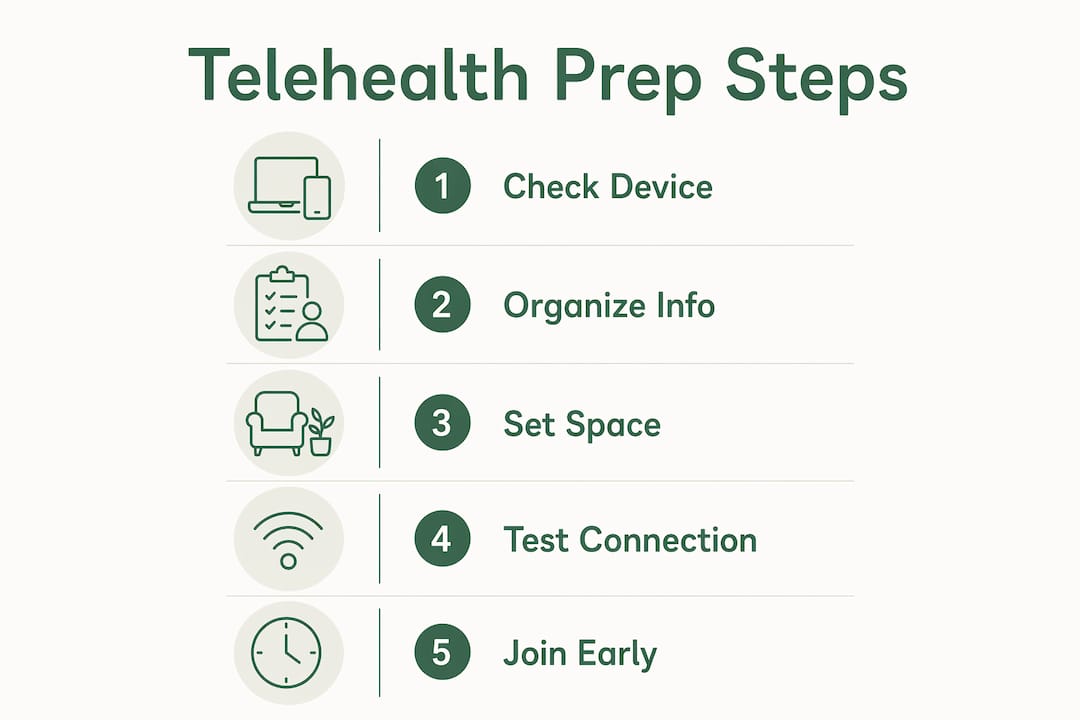
Gather your health data 30 minutes before your session begins. This includes your current medications with exact dosages, any supplements you take, and a written description of your symptoms including when they started and how they have changed. Providers make better decisions when they have a clear timeline.
Write down every question you want to ask before the call starts. The American Heart Association recommends preparing a list of questions to address all your health concerns during the visit. Patients who arrive with written questions consistently cover more ground than those who rely on memory alone.
Have your pharmacy information ready, including the pharmacy name, phone number, and address. If your provider needs to send a prescription, having this on hand avoids delays. Keeping your medication bottles nearby allows for real-time verification of drug names and dosages during the call.
Medical information checklist:
- Full list of current medications and dosages
- Names of any supplements or over-the-counter products you take
- Written symptom description with start date and progression
- List of questions for your provider, ranked by priority
- Pharmacy name, address, and phone number
- Insurance card and member ID number
Pro Tip: Use a notes app on your phone or a simple notepad to track symptoms in the days leading up to your appointment. Specific details like “the pain started four days ago and worsens after eating” give your provider far more to work with than a general complaint.
For additional guidance on what to bring and discuss, the questions to ask your physician guide from Gardenstatemedicalgroup walks you through building a focused question list before any consultation.
What makes an ideal environment for a virtual appointment?
Your physical space affects both the quality of your visit and your privacy. A poorly chosen location can compromise what you share with your provider and make it harder for them to assess you accurately.
Choose a private room where no one else can hear your conversation. HIPAA standards require that patient health information stays confidential, and that obligation extends to your end of the call. A bedroom with a closed door works well. Avoid common areas like kitchens or living rooms where family members or roommates may walk through.
Lighting is a clinical factor, not just a cosmetic one. Good front-facing lighting helps your provider evaluate physical symptoms like skin tone, swelling, or throat redness more accurately. Position a lamp or sit facing a window so the light falls on your face, not behind you. Backlighting turns you into a silhouette and makes visual assessment nearly impossible.
Reduce background noise as much as possible. Turn off televisions, silence phone notifications, and let others in your home know you are in an appointment. Using headphones adds a layer of audio privacy and reduces the chance that sensitive information carries through walls.
Place your device on a stable, flat surface at eye level. A device that wobbles or sits too low forces awkward camera angles that reduce the provider’s ability to see you clearly. Preparing your physical environment is an often overlooked step that directly improves the quality of your visual assessment during the visit.
What should you do on the day of your telehealth appointment?
Day-of preparation follows a clear sequence. Skipping steps creates avoidable problems during the call itself.
-
Sign in 15 minutes early. Joining the virtual waiting room early gives you time to run software checks and fix any technical issues before your scheduled time. Providers move on if patients are not present at the start.
-
Check your battery and connection. Plug in your device or confirm it is fully charged. Run a quick speed test or load a video to confirm your internet is stable.
-
Gather your notes and health information. Place your medication list, symptom notes, and question list within reach. You should not need to leave the room during the call.
-
Adjust your camera and audio. Open the app, check your camera angle, and confirm your microphone is working. Make sure your face is centered and well lit.
-
Close unnecessary apps and browser tabs. Background apps consume bandwidth and processing power. Closing them reduces the chance of lag or freezing during the call.
-
Have a backup plan ready. If your connection drops, switch to your backup device immediately or call your provider’s office directly to continue by phone. Do not spend the appointment troubleshooting. Most providers have a phone fallback protocol for exactly this situation.
-
Communicate clearly during the visit. Speak at a normal pace, pause after each point, and confirm your provider heard you correctly. If you do not understand something, ask for clarification before the call ends.
For a broader look at accessing virtual care, the telehealth services guide from Gardenstatemedicalgroup covers platform access and scheduling in detail. Patients managing ongoing conditions may also benefit from reviewing holistic add-ons to conventional treatment to discuss complementary approaches with their provider during the visit.
Key Takeaways
Preparing for a telehealth visit requires three things done well: a tested device, organized medical information, and a private, well-lit space.
| Point | Details |
|---|---|
| Test technology in advance | Update your app, test your camera and microphone, and confirm a stable internet connection before the appointment day. |
| Organize health information early | Gather medications, symptom notes, and a written question list at least 30 minutes before the call starts. |
| Set up a private, well-lit space | Choose a closed room with front-facing light and minimal background noise to protect privacy and aid visual assessment. |
| Sign in 15 minutes early | Early login allows time for software checks and troubleshooting without losing scheduled appointment time. |
| Have a backup plan | Keep a second device charged and know your provider’s phone number in case the video connection fails. |
What I have learned from watching patients struggle with telehealth prep
Most patients underestimate how much the environment matters. I have seen well-prepared patients with thorough medication lists and thoughtful questions get a subpar visit simply because they sat with a window behind them or used a laptop balanced on a couch cushion. The provider could not see them clearly, and the clinical value of the call dropped immediately.
The other pattern I notice is patients who treat telehealth as a lower-stakes version of an in-person visit. Telehealth is best suited for non-emergency needs like minor illnesses, medication reviews, and follow-ups. That does not mean it deserves less preparation. A focused 15-minute virtual visit with a prepared patient often produces better outcomes than a rushed in-person appointment where the patient forgot half their questions.
Honesty matters more in telehealth than patients realize. Without the ability to physically examine you, your provider depends entirely on what you describe. Vague answers produce vague guidance. Specific, honest symptom descriptions give your provider the information they need to make sound clinical decisions.
My strongest advice is to prepare your space and your information the night before, not the morning of. Day-of preparation invites last-minute stress. When you walk into your appointment calm and organized, the conversation with your provider is more productive, and you leave with clearer answers.
— Krunal
Telehealth services at Gardenstatemedicalgroup
Gardenstatemedicalgroup serves patients in North Bergen and Secaucus, New Jersey, with a full range of primary care and specialty services designed for both in-person and virtual visits. The practice accepts most major insurance plans and offers flexible scheduling to fit your needs.
Whether you need a routine checkup, a medication review, or follow-up care for a chronic condition, the team at Gardenstatemedicalgroup is ready to help. Patients managing ongoing health concerns can also explore the chronic care management program for structured, ongoing support between visits. Schedule your appointment through the primary care services page and come prepared for a visit that works.
FAQ
What do I need for a telehealth visit?
You need a device with a working camera and microphone, a stable internet connection, and an updated telehealth app or browser. Have your medications, symptom notes, and insurance information ready before the call.
How early should I log in for a telehealth appointment?
Sign into the virtual waiting room at least 15 minutes before your scheduled time. This gives you time to complete software checks and resolve any technical issues without delaying your appointment.
Does insurance cover telehealth visits?
Coverage varies by plan and provider. Verify your telehealth benefits directly with your insurance company before the visit, since telehealth policies often differ from in-person visit coverage.
What if my internet connection drops during the visit?
Switch to a backup device immediately or call your provider’s office to continue the appointment by phone. Most providers have a phone fallback protocol, so do not spend time troubleshooting during the call.
How do I prepare my space for a telehealth appointment?
Choose a private room with a closed door, position yourself facing a light source, and reduce background noise. Place your device on a stable surface at eye level so your provider can see you clearly throughout the visit.